Kosmos building blocks
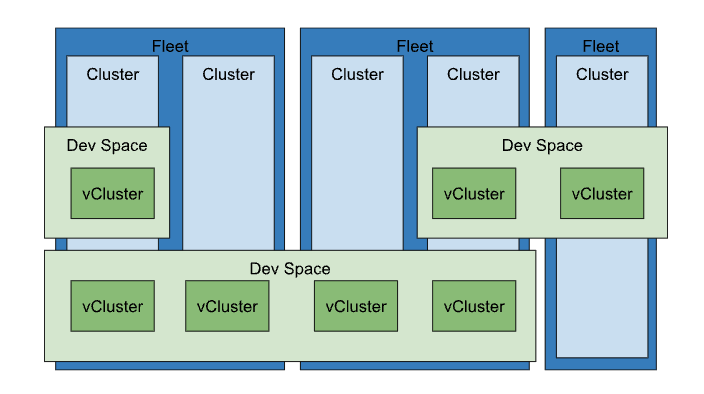
Fleet
Kosmos Fleet provides a suite of tools to help your organization—whether infrastructure operators, workload developers, or security and network engineers—manage clusters, infrastructure, and workloads across SPC, public clouds, and on-premises environments. These tools are centered around the concept of a “fleet,” which is a logical grouping of Kubernetes clusters and resources that can be managed collectively.
As organizations adopt cloud-native technologies like containers, container orchestration, and service meshes, they often reach a point where a single cluster is no longer enough. There are various reasons for deploying multiple clusters to meet technical and business goals, such as separating production from non-production environments or dividing services across different tiers, locations, or teams. You can explore the benefits and tradeoffs of multi-cluster approaches in multi-cluster use cases.
Kosmos introduce the concept of a fleet to simplify managing multiple clusters, regardless of the project they belong to or the workloads they handle. For instance, imagine your organization has ten projects, each with two clusters running different production applications. Without fleets, making a system-wide change would require modifying each cluster individually across multiple projects. Even monitoring multiple clusters would involve switching between different project contexts. Fleets allow you to logically group and manage clusters, enabling centralized management and observability through a single “fleet host project.”
Fleets go beyond simple cluster grouping. They enable fleet-based features that allow you to manage resources across clusters, abstracting away cluster boundaries. For example, you can assign resources to specific teams that span multiple clusters or automate applying uniform configurations across your fleet.
A fleet can consist entirely of Kubernetes Engine clusters on SPC or include clusters outside cloud as well.
Key features of Fleets
- Multi-cluster management: Fleets help in managing clusters across different projects and environments (e.g., production, staging) from a single logical group.
- Unified observability: With fleets, you can monitor and manage all clusters from a central location, making it easier to get an overview of your entire environment.
- Consistency: Fleets enable the application of uniform policies and configurations across all clusters, simplifying operations like security management, policy enforcement, or configuration rollout.
- Fleet-based services: Features like multi-cluster services and workload identity federation are enabled through fleets, allowing workloads to communicate seamlessly across clusters.
- Cross-cluster capabilities: Fleets abstract away individual clusters, allowing workloads to be distributed and resources managed across multiple clusters in different locations.
Clusters
A cluster in the context of Kosmos is any Kubernetes cluster that can be connected to and managed through the Kosmos UI and CLI. This could be a local Kubernetes cluster where Kosmos is installed or an external cluster, such as one deployed on a cloud provider.
When a cluster is connected to Kosmos, Kosmos automatically attempts to install the Kosmos agent on the cluster. The Kosmos agent is responsible for managing all future interactions with that cluster.
Once the connection is established, you can create virtual clusters and devspaces within the selected cluster.
DevSpaces
DevSpaces in Kosmos are standard Kubernetes namespaces managed by Kosmos and assigned to a specific user or team. In Kubernetes, devspaces help isolate resources within a single cluster.
In Kosmos, every Devspace is linked to a cluster and project and is created from a template to ensure that the space and its objects follow best practices for isolation. You can easily manage access to a space and connect to it using kubectl.
DevSpace is a user’s own workspace with the limited features focusing on managing the vClusters on the shared resources. The user’s vClusters in the DevSpace are running on the shared physical K8s clusters managed by Kosmos Operators.
Key features of DevSpaces
- Isolation within a cluster: DevSpaces are useful for isolating workloads, resources, and policies within a single cluster. For instance, each team or application can have its own space, with quotas, permissions, and policies specific to that space.
- Resource management: Administrators can define resource quotas and limits for DevSpaces, ensuring that different parts of an organization or application don’t consume more resources than allocated.
- Multi-tenancy: Devspaces help implement multi-tenancy within a single cluster by creating logical boundaries between tenants, teams, or services.
- Scoped resource management: Kubernetes objects like pods, services, and secrets are scoped to devspaces, meaning they can exist with the same name in different devspaces without conflict.
Virtual clusters
A virtual cluster is a fully operational Kubernetes cluster that runs within a namespace of another Kubernetes cluster, often referred to as the “host” or “parent” cluster. Virtual clusters serve as a powerful tool for overcoming the limitations of traditional Kubernetes namespaces.
In many cases, administrators may be unable or unwilling to adjust the multi-tenancy configurations of the parent cluster to meet user requests. For example, some users might need to create Custom Resource Definitions (CRDs) that could affect others in the cluster, or they may need communication between pods in different spaces, which standard NetworkPolicies might not allow. Virtual clusters offer an ideal solution in these scenarios.
The virtual cluster functionality in Kosmos is powered by the open-source project vCluster . Kosmos adds a centralized management layer, allowing users to create virtual clusters in any Kosmos-managed (or virtual) cluster. Kosmos also lets you import existing virtual clusters for management from a central Kosmos instance.
vClusters in practice
By implementing virtual clusters, organizations can effectively partition a single physical Kubernetes cluster into multiple logical clusters, while still leveraging Kubernetes features like resource optimization and workload management.
Previously, Kubernetes namespaces provided a degree of partitioning, but with significant limitations:
Cluster-scoped resources: Some resources, such as operators, operate at a global cluster level and cannot be isolated by namespaces. For example, installing different versions of an operator in the same cluster was not feasible.
Shared control plane: In a standard Kubernetes setup, components like the API server, etcd, scheduler, and controller-manager were shared across all namespaces, making it difficult to enforce rate limits or isolate failures.
With the introduction of virtual clusters, these challenges have been overcome. Virtual clusters provide a dedicated Kubernetes API server for each cluster, eliminating the constraints associated with cluster-scoped resources and shared control planes.
In addition to this, virtual clusters have enhanced stability. By storing their own resource objects in a separate data store, independent of the host cluster, virtual clusters ensure that errors in shared cluster resources (e.g., CRDs or cluster roles) no longer affect other teams.
Moreover, virtual clusters have proven to be a cost-saving measure. Rather than creating additional physical clusters to manage resource isolation, administrators can now run multiple virtual clusters within a single physical cluster. This not only reduces the overhead associated with running multiple control planes but also simplifies cluster maintenance, making it an ideal solution for sandbox environments, continuous integration, and experimental setups.
Finally, virtual clusters offer improved flexibility for multi-tenancy. Since each virtual cluster can be configured independently of the physical cluster, this approach allows for quick environment setups, perfect for scenarios like spinning up demo applications for sales teams or provisioning isolated environments for different customers.
Fleet vs DevSpaces
Fleet is a logical workspace for managing host clusters, while devspaces is a logical workspace for managing virtual clusters (vClusters). Fleet and DevSpace support create, read, update, and delete (CRUD) operations.
Fleets manage clusters, while devspaces manage resources within those clusters.
- Fleet: Manages clusters at a higher, multi-cluster level, making it easier to manage large-scale deployments across different environments or regions.
- Devspaces: Operates within a single cluster to create logical separations, improving resource isolation and management within that cluster.
In Kosmos, both Fleets and DevSpaces are important concepts, but they serve different purposes and operate at different levels of the infrastructure. Here’s a breakdown of the key differences between them:
1. Fleet (Cluster-level grouping across multiple clusters)
A Fleet is a higher-level concept in Kosmos used to group multiple clusters, regardless of which project they belong to. Fleets allow organizations to manage and observe clusters at scale, centralizing administration, configuration, and visibility across clusters.
2. DevSpaces (within a single cluster)
A DevSpaces is a Kubernetes resource used to logically divide resources within cluster. DevSpaces allow multiple teams, applications, or services to share the same physical cluster while maintaining separation between their resources. User vCluster can be assigned to any of the cluster available in the group of clusters.
Key differences between Fleets and Devspaces
| Feature | Fleets | Devspaces |
|---|---|---|
| Scope | Multi-cluster, spanning across projects | Single cluster |
| Purpose | Centralized management of multiple clusters | Logical separation within a cluster |
| Management Level | Cluster-level, across clusters | Resource-level, within one cluster |
| Use Case | Grouping clusters, cross-cluster features | Isolating resources for teams or apps |
| Enforcement | Cluster-wide policies, multi-cluster services | Resource quotas, RBAC within the cluster |
| Workload Boundaries | Spans clusters | Stays within a single cluster |